Stop Advertising Products You Can't Win On Price — The Pricing Intelligence Framework
Stop Advertising Products You Can't Win On Price — The Pricing Intelligence Framework
Keywords: pricing intelligence ad targeting, competitor pricing ecommerce, google ads pricing strategy, pricing position matrix
Introduction
An e-commerce store runs Google Ads for hundreds of SKUs. Some portion of those SKUs are priced higher than the competition. Every dollar spent advertising those products is fighting a battle the store can't win on price — and the team wonders why ROAS is declining.
The fix isn't better ad copy, smarter bidding, or broader audiences. It's knowing which products you can profitably advertise and which ones you can't. That requires pricing intelligence feeding directly into your ad targeting decisions.
This is a gap in nearly every e-commerce operation we audit. Pricing data and ad data live in different systems, managed by different teams, reviewed on different cadences. The pricing team sets prices. The marketing team runs ads. Nobody checks whether the products being advertised are actually competitive on price.
This article presents the framework we use to close that gap: scrape competitor prices, build a pricing position matrix, and let the matrix drive ad spend allocation.
The Pricing-Advertising Gap
Consider the typical flow:
- Marketing team selects products to advertise based on margin, inventory levels, or seasonal relevance.
- Google Ads campaigns are built around those products.
- Competitors adjust their prices — sometimes weekly, sometimes daily.
- The ads keep running on the original product selection.
- ROAS declines because shoppers see your ad, click through, then compare prices and buy elsewhere.
The problem isn't that the ads don't work. The ads drive traffic just fine. The problem is that the traffic lands on products where you've been undercut, and price-sensitive shoppers leave.
Google doesn't know or care about your competitors' prices. It optimises for clicks and conversions within your campaigns. If your campaigns include products where you're 15% more expensive than the alternative, Google will still spend your budget showing those ads. It's your job to exclude them.
The Pricing Position Matrix
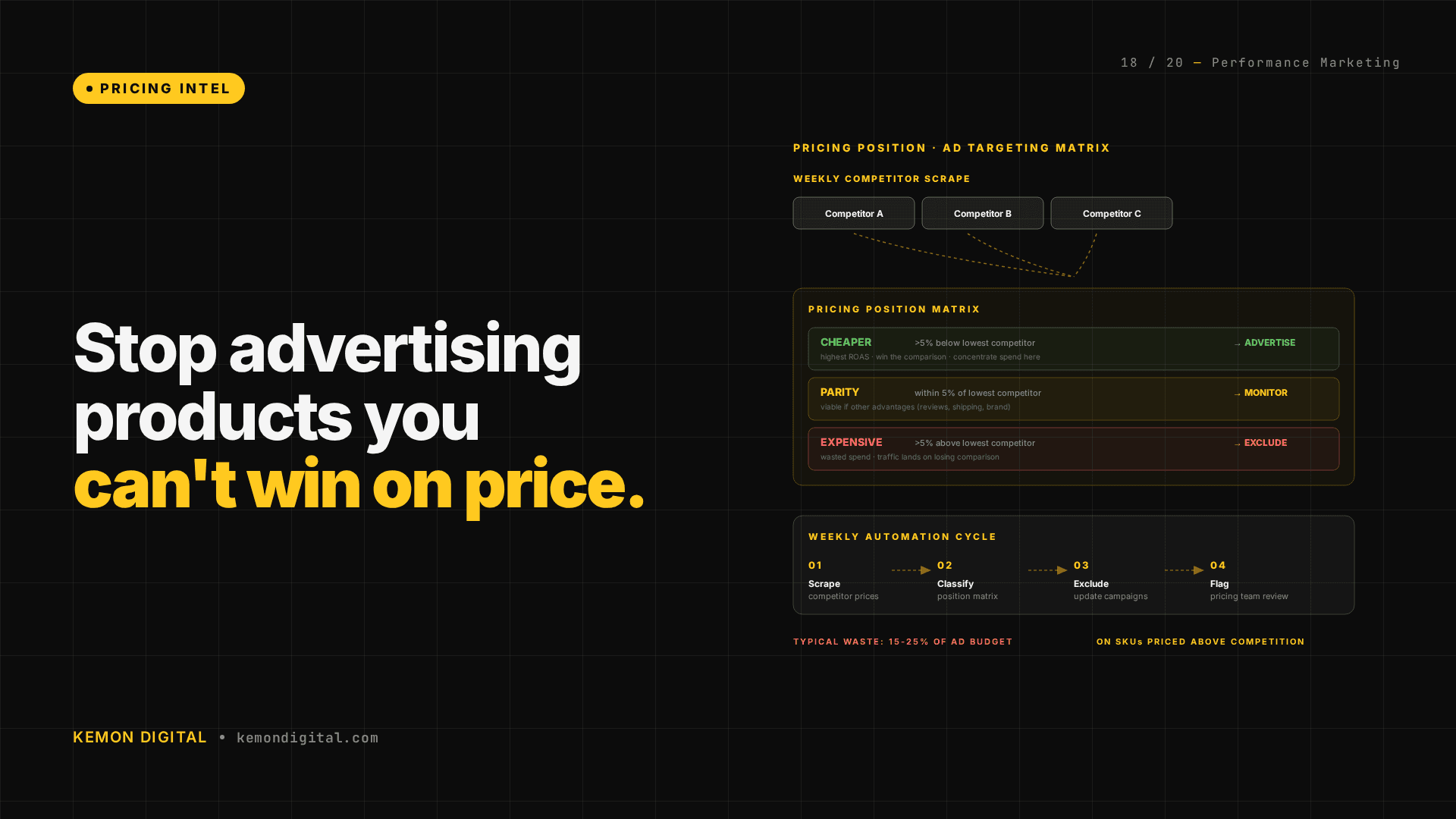
The framework starts with a simple classification. For every SKU you advertise, determine your pricing position relative to the competition:
Cheaper — you have a price advantage. This is where ad spend generates the highest return because you can win the comparison.
Parity — you're priced roughly the same. These are viable ad targets if you have other advantages (better reviews, faster shipping, stronger brand).
More expensive — the competitor undercuts you. Ad spend on these SKUs drives traffic to a losing comparison. Unless you have a compelling non-price differentiator, this is wasted budget.
The matrix maps every advertised SKU into one of these three buckets. The insight is immediate: what percentage of your current ad spend is going to SKUs where you're more expensive?
In the operations we've audited, that number is typically 15-25%. That's 15-25% of ad budget buying clicks that lead to unfavourable price comparisons.
Building the Pipeline
Step 1: Scrape competitor prices
Identify your top competitors for each product category. For most e-commerce operations, that's three to five competitors. Build a weekly price scrape that captures their pricing on the SKUs you advertise.
Tools: Python scripts with request libraries for basic scraping. Browser automation for sites with dynamic rendering. Third-party pricing tools if you need coverage across hundreds of competitors.
Frequency: weekly minimum. Daily for high-velocity categories where pricing changes frequently.
Output: a table with columns for SKU, your price, competitor prices, and the delta.
Step 2: Classify pricing position
For each SKU, calculate the pricing position:
- Cheaper: your price is more than 5% below the lowest competitor
- Parity: within 5% of the lowest competitor
- More expensive: more than 5% above the lowest competitor
The 5% threshold is adjustable based on your category. For commodity products (groceries, electronics), even 2-3% matters. For differentiated products (luxury fashion, artisan goods), 10-15% may still be acceptable if the brand premium justifies it.
Step 3: Map to ad campaigns
Cross-reference the pricing position matrix with your active Google Ads campaigns. For each campaign and ad group, calculate:
- What percentage of the advertised SKUs are in each pricing position?
- What percentage of spend is going to "more expensive" SKUs?
- Which specific SKUs are you advertising at a price disadvantage?
Step 4: Reallocate
The action plan:
- Concentrate spend on "cheaper" and "parity" SKUs. These are the products where ad spend converts because you can win the comparison.
- Exclude "more expensive" SKUs from paid campaigns. They can still rank organically — organic visitors have different intent and price sensitivity than ad-click visitors.
- Flag "more expensive" SKUs to the pricing team. The pricing intelligence doesn't just inform ads — it triggers pricing reviews. Maybe the competitor is running a temporary promotion. Maybe your margin allows a price match. The decision is the pricing team's, but the data should reach them automatically.
Step 5: Automate the loop
The pipeline should run on a cycle:
- Weekly scrape updates competitor prices.
- Pricing position matrix recalculates automatically.
- Exclusion list updates for ad campaigns.
- Pricing team receives flagged SKUs for review.
This turns a one-off audit into a continuous system. Competitor pricing changes are reflected in your ad targeting within a week.
The Tool Use Principle
Anthropic's agent design guide describes a principle we apply directly here: the most powerful AI agents aren't the ones with the best reasoning — they're the ones with the best access to real-world data.
Our pricing agent doesn't just analyse internal data. It pulls competitor pricing through scraping tools, cross-references that with our product catalogue and active campaigns, and outputs a prioritised action list: which SKUs to exclude from ads, which to promote, which to flag for pricing review.
The reasoning is straightforward. What makes it powerful is the data access — the ability to pull competitor prices, product data, and campaign data into a single analysis context.
This is the tool use pattern in practice: give your agents access to external data sources so their decisions are informed by the competitive landscape, not just internal metrics.
What Changes After Implementation
The immediate impact is a reduction in wasted ad spend. When you stop advertising products where you can't win on price, cost per acquisition drops because the traffic you're paying for is more likely to convert.
The secondary impact is better pricing decisions. When the pricing team receives weekly data on which products are overpriced relative to the competition — and sees that linked to ad performance — pricing reviews happen faster and are data-informed rather than intuition-driven.
The long-term impact is a feedback loop between pricing and marketing that most e-commerce operations don't have. Pricing decisions affect ad performance. Ad performance data informs pricing decisions. The cycle tightens with every iteration.
FAQ
Q: What if my competitor's lower price is temporary (a sale or promotion)?
A: The weekly cadence of the scrape captures this. If a competitor runs a one-week promotion, that SKU moves to "more expensive" for one cycle and then back. The system handles this automatically — you're not making permanent decisions based on temporary pricing. For highly volatile categories, increase the scrape frequency to daily.
Q: This sounds like a lot of work. Can I start small?
A: Start with your top-spending SKUs. The Pareto principle applies: a small percentage of your SKUs consume the majority of your ad spend. Run the pricing position analysis on just those. The first round typically reveals enough waste to justify expanding.
Q: What about products where brand justifies a premium?
A: Adjust the threshold. For luxury or differentiated products, a 15% premium may be acceptable if the brand name drives conversions regardless of price. The framework is flexible — the pricing position thresholds should reflect your category dynamics, not a rigid rule.
Q: Does this work for marketplace sellers (Amazon, Shopee, Lazada)?
A: Yes, and it's arguably more important. Marketplace shoppers compare prices directly on the platform. Ad spend on a marketplace listing where you're not the lowest price (or at least competitive) is almost guaranteed waste. The framework applies identically — scrape competitor prices, classify position, adjust ad spend.
Q: How do I handle products with no direct competitor equivalent?
A: If a product is genuinely unique (no comparable SKU elsewhere), it doesn't need pricing position analysis — you set the market price. The framework is most valuable for products with direct substitutes where the shopper can easily compare.
Q: Should I automate the ad exclusions or review them manually?
A: Start with manual review of the exclusion list for the first few cycles. Once you trust the classification (pricing position thresholds are calibrated correctly, competitor data is accurate), automate the exclusions via Google Ads scripts or rules. Keep the pricing team notifications manual — those require human judgment.