GA4 Purchase Events Reading Zero? How to Diagnose It in 10 Minutes
GA4 Purchase Events Reading Zero? Here's How to Diagnose It in 10 Minutes
The problem
Your order database shows confirmed paid transactions. Your payment processor shows cleared payments. Your GA4 Monetization overview reads RM 0.00. Google Ads is optimizing on zero conversions.
This isn't a tracking bug — it's a signal that the measurement pipeline has drifted from reality. And there's a good chance the fix is not hours of debugging, but minutes of targeted diagnostics.
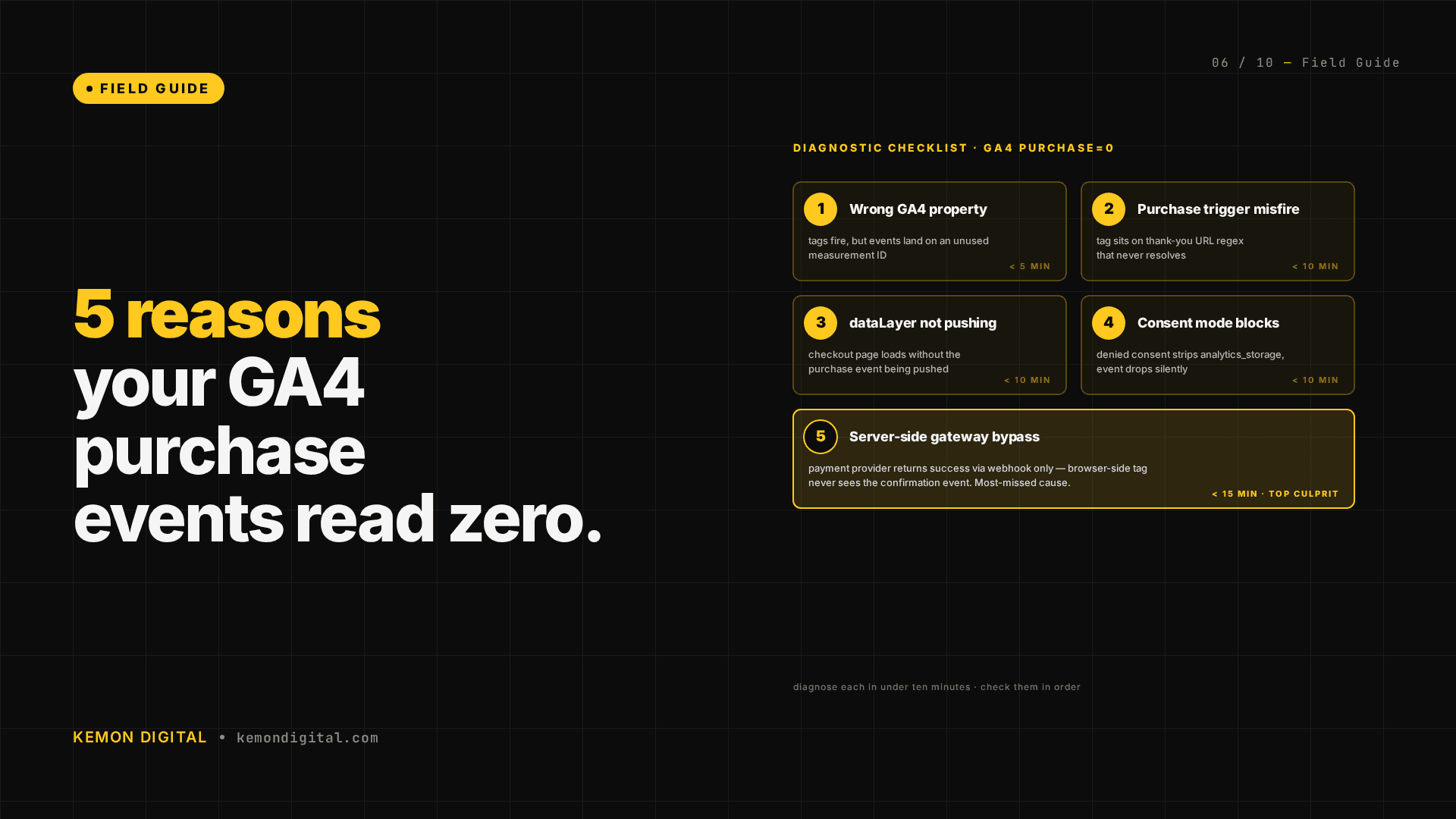
This guide walks through the five root causes we've encountered in production, the diagnostic question for each, and how to fix it.
The 5 root causes: at a glance
| # | Cause | Symptom | Diagnostic | Fix time |
|---|---|---|---|---|
| 1 | Wrong GA4 property | GA4 reads zero; Google Ads sees zero value | GTM Measurement ID doesn't match Google Ads property | 5 min |
| 2 | Backend gateway callback (no browser) | Orders complete but GA4 sees 20–30% of them | App logs show fewer confirmation page loads than orders | 10 min |
| 3 | Nginx GeoIP whitelist blocks callbacks | Orders complete; zero GA4; zero errors | Callback IPs missing from Nginx geo whitelist | 5 min |
| 4 | Missing dataLayer in alternate template | Some purchases tracked; gap = backend callback volume | Multiple confirmation templates; one missing the push | 7 min |
| 5 | Cross-domain redirect breaks cookies | Confirmation page loads but purchase event doesn't fire | Browser DevTools: g/collect request missing after redirect | 10 min |
Root cause #1: GTM is firing to the wrong GA4 property
When this happens: You set up GA4. You set up Google Ads conversion tracking. They're using different GA4 properties. GTM is firing purchase events to one; Google Ads is linked to the other.
How to spot it:
- Open GTM → your tag container → Tags → GA4 Config tag.
- Copy the Measurement ID (format:
G-XXXXXXXXXX). - Open Google Ads → Tools → Conversions → click the
purchaseconversion. - Scroll to "Import Source" — note which GA4 property it shows.
- Do the Measurement IDs match? If not, you're firing to the wrong place.
The fix:
Option A — Simple, one-property approach:
- Delete the GA4 Config tag that's pointing to the wrong property.
- Create a new GA4 Config tag pointing to the property Google Ads is linked to.
- Publish a new GTM version.
Option B — Multi-property approach:
- Keep the existing GTM setup for internal dashboards.
- Add a second GA4 Config tag (or a second
purchaseevent tag) that fires the same purchase data to the Google Ads-linked property. - Both properties get data; Google Ads gets real conversion data.
Why this matters: If Google Ads is linked to a property that never receives purchase events, the bid optimizer has nothing to optimize on. You're flying blind.
Root cause #2: Payment gateway callback timing (backend vs. browser)
When this happens: Your payment processor uses two callback paths:
- Backend server-to-server (majority of transactions): The gateway notifies your server. Order is marked paid. The user never returns to your site.
- Frontend browser redirect (minority of transactions): The user is redirected back to your confirmation page. You fire the purchase event.
If you only instrument the browser redirect path, you're only tracking 20–30% of purchases.
How to spot it:
- SSH into your production environment.
- Check your application logs. Look for requests to
/checkout/confirmedor your confirmation page endpoint. - Count the number of confirmation page hits. Compare to your database order count for the same period.
- If confirmation page hits are 20–30% of orders, you're backend-callback-only for the majority of transactions.
Alternatively, use Rails runner (or your equivalent):
# Count orders marked paid in the last 24 hours
Order.where(status: 'paid', created_at: 24.hours.ago..Time.now).count

# Count GA4 purchase events in the same period (check GA4 Reporting API or just look at the Events card)
# Expected: order count should roughly match purchase events
The fix:
Move the purchase event instrumentation from the confirmation page to the backend payment handler:
# In your payment confirmation controller/service
def handle_gateway_callback(order_id, status)
  order = Order.find(order_id)
  order.update(status: 'paid')

  # Fire the purchase event server-side or via pixel
  # GTM conversion pixel, or an API call to your server
  # that triggers the dataLayer push on the next page the user sees

  # Option: generate a pixel request that notifies GA4 directly
  ga4_measurement_id = "G-XXXXXXXXXX"
  payload = {
    measurement_id: ga4_measurement_id,
    api_secret: ENV['GA4_API_SECRET'],
    events: [{
      name: 'purchase',
      params: {
        transaction_id: order.id,
        value: order.total,
        currency: 'MYR',
        items: [...order items...]
      }
    }]
  }
  # POST to https://www.google-analytics.com/mp/collect
end
Or: capture the order ID in the URL when the user returns to your site (?order_id=12345), then query your API on page load to fetch order details and fire the purchase event if the order is paid.
Why this matters: If you only fire purchase events from the browser redirect, you're losing 70–80% of your conversion data.
Root cause #3: Nginx GeoIP whitelist blocks gateway callbacks
When this happens: Your Nginx configuration has a strict GeoIP whitelist:
geo $country_allowed {
  default no;
  MY yes;
  SG yes;
}

if ($country_allowed = no) {
  return 444;
}
When the payment gateway's callback server (located in another country) tries to POST to your endpoint, Nginx returns a 444 (Connection Dropped). No error log. No record. The callback never reaches your application.
How to spot it:
- SSH into production. Check your Nginx configuration:
grep -r "geo " /etc/nginx/
grep -r "return 444" /etc/nginx/
-
If you see a
default noin a geo block, you have a whitelist. -
Check your Nginx access logs while a payment completes:
tail -f /var/log/nginx/access.log | grep "callback\|payment\|gateway"
- If your payment processor is sending callbacks but you see zero entries in the access log, Nginx is silently dropping them.
The fix:
- Get the payment gateway's callback server IP address(es) from their documentation.
- Whitelist those IPs explicitly:
geo $country_allowed {
  default no;
  MY yes;
  SG yes;
  203.0.113.45 yes;  # iPay88 callback server
  198.51.100.89 yes; # Alternative callback server
}
- Or: add a bypass for the callback endpoint:
if ($uri ~ ^/payment/callback) {
  set $country_allowed yes;
}

if ($country_allowed = no) {
  return 444;
}
- Test: submit a test payment and verify the callback succeeds (check your application logs).
Why this matters: A 444 response is intentional — it means "I received your request but I'm not sending a response." There's no error. The gateway thinks it succeeded. Your server never knows the callback happened.
Root cause #4: Missing purchase dataLayer in alternate confirmation template
When this happens: Your confirmation page has multiple render paths:
- Main path (
/checkout/confirmed): renders when the user is redirected from the gateway. Has thedataLayer.push({event: 'purchase', ...}). - Alternate path (
/checkout/confirmed_backendor similar): renders when your backend processes a payment server-side and the user hasn't visited a page yet. Missing the dataLayer push.
If the majority of orders go through the backend path, the majority of purchases are missed.
How to spot it:
- Search your codebase for every reference to the confirmation page:
grep -r "confirmed" app/controllers/ app/views/ | grep -E "render|redirect"
-
Count the render paths. Look for:
render :confirmed(main path)render :confirmed_backend(alternate path)render :confirmed_alternate(another path)
-
Check where each is called from. Which controller action handles the majority of traffic?
-
Cross-check with GA4: count purchase events. Compare to your database order count. If the gap equals the backend callback volume, you've found it.
The fix:
- Copy the dataLayer purchase push from the main template to the alternate template:
<!-- app/views/checkout/confirmed.html.erb -->
<script>
window.dataLayer = window.dataLayer || [];
window.dataLayer.push({
  event: 'purchase',
  transaction_id: '<%= @order.id %>',
  value: <%= @order.total %>,
  currency: 'MYR',
  items: [
    <% @order.items.each do |item| %>
    {
      item_id: '<%= item.sku %>',
      item_name: '<%= item.name %>',
      price: <%= item.price %>,
      quantity: <%= item.quantity %>
    },
    <% end %>
  ]
});
</script>
-
Add the same block to the alternate template.
-
Or: move the block to a shared partial and render it in both templates.
-
Test both paths: trigger a payment via gateway redirect, and trigger one via backend confirmation. Both should fire GA4 purchase events.
Why this matters: If you instrument only one path and the majority of traffic flows through the other, you're silently losing most of your conversion data.
Root cause #5: Cross-domain redirect breaks session cookies
When this happens: The payment gateway redirects the user through multiple domains before returning to your site:
yoursite.com → gateway.com → callback-tracking.gateway.com → yoursite.com/checkout/confirmed
Session cookies (including tracking IDs) are dropped. When the user lands on your confirmation page, JavaScript runs but session context is lost. Or the confirmation page looks for a session cookie and refuses to load.
How to spot it:
- Open your browser DevTools → Network tab.
- Trigger a test payment.
- Watch the redirect chain. Count the domains.
- After the final redirect lands on your confirmation page, check the Cookies tab. Is your session cookie still there and valid?
- Check the Network tab for the
g/collectPOST request. Does it appear? If not, GTM isn't firing.
The fix:
Option A — Cookie whitelist (if you control both domains):
Set-Cookie: session_id=xyz; SameSite=None; Secure; Domain=.yoursite.com
This allows the cookie to survive cross-domain redirects (but requires Secure/HTTPS).
Option B — Order ID in URL (no session cookie required):
- When the gateway redirects back to you, include the order ID in the URL:
yoursite.com/checkout/confirmed?order_id=12345&reference=abc123
- On your confirmation page, capture the order ID from the URL parameter.
- Query your API to fetch order details:
const params = new URLSearchParams(window.location.search);
const orderId = params.get('order_id');

fetch(`/api/orders/${orderId}`)
  .then(r => r.json())
  .then(order => {
    if (order.status === 'paid') {
      window.dataLayer.push({
        event: 'purchase',
        transaction_id: order.id,
        value: order.total,
        // ...
      });
    }
  });
Option C — Add Google Ads parameters:
Include gclid or fbclid in the redirect URL so Google Ads can link the conversion back to the original ad:
yoursite.com/checkout/confirmed?order_id=12345&gclid=abc123xyz
- Test: verify the
g/collectrequest appears in the Network tab and fires successfully.
Why this matters: Cross-domain redirects are invisible to code — everything appears to load correctly, but the purchase event never fires because the context was lost in transit.
FAQ
Q: Do all five gaps apply to every e-commerce site?
No. Most sites will hit 1–2 of these. Backend callback + missing template (gaps #2 and #4) tend to occur together. GeoIP blocking (gap #3) requires a specific infrastructure setup. Cross-domain session loss (gap #5) depends on your payment processor's redirect flow.
Q: Can these gaps exist simultaneously?
Yes. A typical scenario: wrong GA4 property (gap #1) + backend callback missing from alternate template (gaps #2 and #4) + GeoIP blocking some callbacks (gap #3). You'd be seeing 5–10% of purchases recorded when you should be seeing 100%.
Q: How do I prevent these gaps from opening?
- Run a quarterly measurement audit. Trace the full payment flow from click to GA4 event.
- Document your GTM setup: which properties receive which events, and why.
- Test your payment flow in staging. Verify GA4 and Google Ads both see the events.
- When you add a new payment method or gateway, run the five diagnostics before going live.
- Use a measurement operations checklist (like the one below) before deploying changes.
Q: Do I need to hire someone to run these diagnostics?
No. The diagnostics above are designed to take 5–10 minutes per gap. If you're comfortable with SSH, GTM, and reading application logs, you can run them yourself. If infrastructure details (Nginx, Rails) are unfamiliar, pair with your backend team for 15 minutes.
Q: What if all five diagnostics pass but purchases still read zero?
If you've ruled out all five, the issue is likely:
- GTM is not loading at all (check browser console for errors).
- Your analytics code is loading from an old URL or has been overridden.
- Your GA4 has an Internal Traffic filter in "Testing" mode (check GA4 Admin → Data Streams → Traffic Settings).
- The purchase event has a different name in GTM than in GA4 (check tag trigger and event name spelling).
Open GTM Preview mode, trigger a test purchase, and watch the Tags Fired tab. That will show you exactly which tags are firing and whether the triggers match.
The checklist: 10 minutes to diagnose
- Database check (2 min): Confirm orders exist and are marked paid. If yes, measurement is the problem.
- GTM property check (2 min): Verify GTM Measurement ID matches Google Ads property.
- Page load check (2 min): Count confirmation page views in logs. Compare to order count. Is the gap large?
- Browser devtools check (2 min): Load confirmation page, open Network tab, trigger test purchase, look for
g/collect. - GTM Preview mode (2 min): Watch the Tags Fired tab. Does the purchase tag appear?
If all five pass, you're in one of the five root causes above. The specific diagnostic for that cause will surface the issue.
Kemon Digital builds AI systems that run on live e-commerce infrastructure. If your GA4 and Google Ads aren't talking, or your database doesn't match your analytics, this is the kind of gap we surface in diagnostics audits. Get in touch if you'd like a 90-minute measurement review.