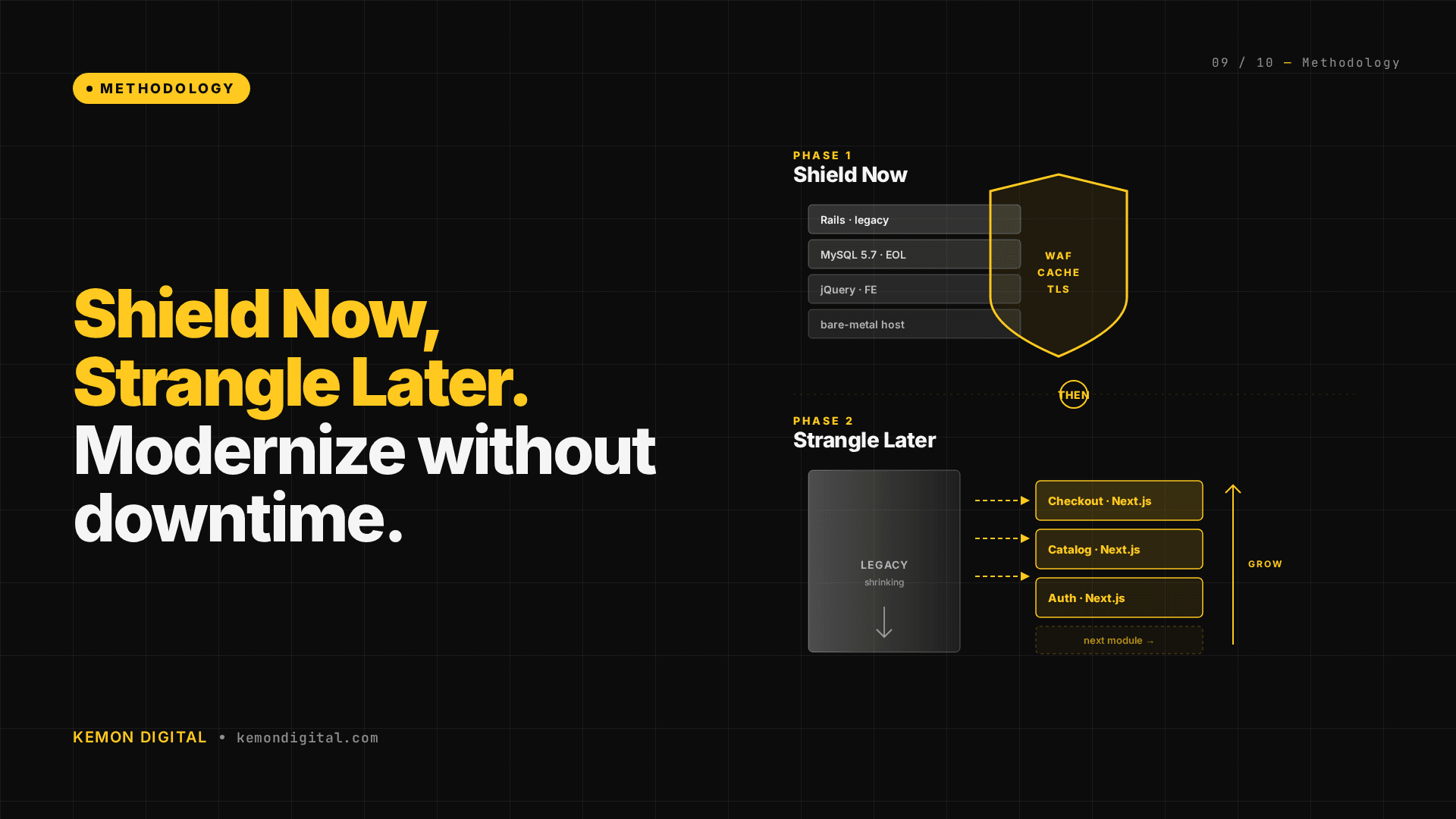
Shield Now, Strangle Later: Modernizing Legacy E-Commerce Without Downtime
Shield Now, Strangle Later: Modernizing Legacy E-Commerce Without Downtime
Meta Description: Framework for migrating live e-commerce platforms from deprecated stacks to modern infrastructure using the Strangler Fig pattern. Zero downtime, full kill switch, cookie-gated rollout.
Keywords: strangler fig pattern ecommerce, legacy rails modernization malaysia, next.js rails migration, b2b ecommerce modernization, zero downtime migration, legacy platform upgrade
Introduction
Most B2B e-commerce platforms in Malaysia are running on legacy stacks that are 7-10 years past end-of-life, built by developers who are no longer around, with zero monitoring and zero backups. Yet they're processing mid-five-figure monthly GMV.
The problem: full rebuilds don't work. You can't take the platform offline, and you can't afford the risk of a big-bang migration.
The solution: the Strangler Fig pattern — a surgical, zero-downtime modernization framework that works on live platforms with critical revenue dependencies.
This guide walks through:
- How to shield a fragile legacy system before touching code
- The Strangler Fig pattern and why it beats rewrites
- A real migration schedule ordered by risk
- How to use reverse proxies, cookie-gated rollouts, and kill switches
Why Full Rebuilds Fail for Live E-Commerce
When your platform is generating mid-five-figure monthly revenue on a live stack, the math of a rebuild looks terrible:
Development Time: 4-6 months of parallel maintenance. The old system is still being patched and evolved. The new system has to chase a moving target.
Launch Risk: You have to take the platform offline to cut over. Even a 6-hour window costs a meaningful percentage of monthly revenue. That risk is often existential.
Parallel System Risk: During the 4-6 month development window, customers are still using the old system. Data is being generated, edge cases are being discovered, configuration changes are being made. The new system has to replicate all of it perfectly.
Fragility During Transition: If the cutover fails, rolling back a 6-month migration isn't "just revert code." It's a complex, multi-step recovery under pressure, often during an outage when the business is bleeding.
The alternative isn't "do nothing." It's the Strangler Fig approach: surgical modernization that keeps revenue flowing while you gradually replace the underlying stack.
Phase 1: Shield Your Legacy System (Before You Change Code)
Before deploying a single line of new code, you need to stop the existing system from silently failing. This phase takes 2 hours and costs pocket-change per month.
Move 1: Automated Backups
Set up weekly snapshots of your database. A single DigitalOcean snapshot every Monday morning, kept for 30 days.
Why: If the database corrupts, you have a recovery point. If ransomware or misconfigured scripts corrupt data, you can roll back to Monday.
Cost: Pocket-change monthly cost for retention.
Deploy time: 10 minutes.
In the context of mid-five-figure monthly volume, this is rounding error insurance.
Move 2: WAF Rules (Cloudflare)
The legacy platform was being hammered by hundreds of thousands of spam requests per day. SQL injection attempts. Weird URL encoding. Requests with URLs so long no legitimate visitor would ever need them.
Deploy a single WAF rule: block any request with a URL longer than 500 characters.
Result: Spam traffic dropped by 90% overnight. Legitimate traffic? Completely unaffected.
Cost: Free (Cloudflare free tier).
Deploy time: 5 minutes.
You're not fixing the application security holes. You're filtering out noise at the edge, so your fragile old system doesn't choke on it.
Move 3: Uptime Monitoring
A simple 5-minute interval health check from an external service. If the platform goes down, automated email alerts.
Cost: Free tier (Uptime Robot, Pingdom).
Deploy time: 10 minutes.
For the first time, you have visibility: is the platform up right now?
Move 4: Configuration Audit
Assume every configuration in the legacy system is either a forgotten workaround, a legacy flag left behind, or a reverse implementation.
In this case: the platform had an IP whitelist meant to allow "internal" users. It was backwards — blocking them. A 1-minute fix to revert to allow-all, with a note to implement proper auth later.
Phase 1 Outcome: You've stopped the platform from silently disappearing. You've reduced noise. You have recovery points. You have visibility. You've bought yourself the safety net to actually think about modernization.
Phase 2: Strangle — The Strangler Fig Pattern
The Strangler Fig is Martin Fowler's term for a migration pattern where you gradually replace a legacy system without replacing the entire thing at once. The metaphor: a strangler fig vine grows on an old tree, eventually replacing it completely. The new growth uses the old tree's structure as scaffolding.
How it works in practice
1. Deploy a reverse proxy (Nginx) in front of the legacy system
All traffic routes through Nginx. Initially, Nginx doesn't change anything — it proxies 100% of requests to the old Rails server.
2. Gradually route new paths to the modern stack
You point specific URL paths (e.g., /products/:id) to a modern Next.js service. Everything else still goes to the old system.
3. Cookie-gated rollout
Add a cookie flag (e.g., sbv2=1). Users with this cookie get routed to Next.js. Everyone else gets the old Rails version. You can:
- Invite internal testers by setting the cookie.
- Gradually increase the percentage of traffic directed to the new version.
- Have full visibility into which users are on which version.
4. Full kill switch: one line of Nginx config
If something breaks on the new stack, one config change reverts 100% of traffic back to the old system. No deploy time. No rollback strategy. Just a config reload.
5. Comprehensive test coverage
You write Playwright tests covering:
- Complete buyer flow (browse → add to cart → checkout).
- Responsive design across devices.
- SEO rendering (JSON-LD schema, Open Graph tags, Twitter cards).
- Cart integration (add to cart in Next.js → item appears in the Rails-based cart).
- Authentication and session handling.
The tests run against both old and new systems in parallel. You're proving the migration doesn't break the buyer journey.
Migration Order: Start with High-Traffic, Zero-Revenue-Risk Paths
Not all pages are created equal. Order your migration by risk:
| Page Type | % of Traffic | Revenue Risk | Current Status |
|---|---|---|---|
| Product detail pages | ~45% | None (browsing) | Live with cookie gating |
| Product listing pages | ~15% | None (browsing) | Deployed |
| Homepage + search | ~10% | None (browsing) | Planned |
| Shopping cart | ~2% | Medium | Planned later |
| Checkout + payment | <1% | Critical (100% of revenue) | Probably never migrated |
Why this order?
If something breaks on product detail pages, users can browse elsewhere. If something breaks checkout, revenue stops immediately.
By the time you consider migrating checkout (if ever), you've already proven the new stack handles 70% of traffic safely. Confidence is earned, not assumed.
Pro tip: You don't have to migrate checkout. Some systems are worth leaving at the edges if they work well enough. The goal is infrastructure modernization, not for modernization's sake.
Real-World Case: Design Refresh + SEO Infrastructure
As part of the modernization, the design evolved. Three candidates were tested; the compact, data-rich variant was chosen — professional B2B design emphasizing product information density and trust signals.
New design elements:
- Social proof counters (customer reviews, units sold).
- Sale pricing display with original price strikethrough.
- Free delivery threshold messaging.
- Delivery window estimates.
- Certification galleries (halal, quality compliance).
- Interactive image gallery with certification thumbnails.
SEO infrastructure (didn't exist in legacy Rails):
- JSON-LD Product schema for search engines.
- Open Graph tags (Facebook sharing previews).
- Twitter Cards.
This is a 2-3 month compounding advantage in organic search visibility and paid social performance. The new stack comes with this infrastructure by default; the old one didn't.
Checklist: Before You Strangle
Before deploying the Strangler Fig pattern:
- Backups are automated and tested (actually restore one to confirm it works).
- Monitoring and uptime alerts are in place.
- WAF rules are filtering noise.
- Configuration audit is complete (IP whitelist, cache settings, feature flags).
- Reverse proxy is in place and routing correctly (Nginx, Apache, or AWS ALB).
- New stack (Next.js, modern Rails, whatever) is running in parallel.
- Cookie-gated rollout is implemented and tested.
- Comprehensive Playwright test suite covers buyer flow + edge cases.
- Kill switch is documented and tested (commit a config that reverts to 100% legacy; confirm it works).
FAQ
Q: Doesn't the Strangler Fig pattern add complexity?
A: Yes, temporarily. You're running two systems in parallel. But that parallelism is how you prove the new system works. It's not complexity for complexity's sake — it's risk mitigation. Once the new system has proven itself across 70% of traffic and all buyer journeys, you can confidently migrate the last 30%.
Q: What if the two systems have different databases?
A: This is where the migration order matters. Start with read-only paths (product browsing). For write operations (cart, checkout), the new system writes to the old system's database while you migrate data. Or you keep checkout on the old system forever — that's perfectly fine if it works.
Q: How long does a Strangler Fig migration take?
A: Depends on scope. Migrating product browsing (45% of traffic)? 2-3 weeks if you have the team. Migrating cart and checkout? 2-3 months. A full platform rewrite? 4-6 months, with downtime risk.
The beauty of the Strangler Fig is: you don't have to do it all at once. You migrate path by path, feature by feature, over weeks or months, while revenue flows and the business operates normally.
Q: What if we hit a bug in the new system?
A: One Nginx config line reverts 100% of traffic back to the old system. No rollback complexity. No downtime. You fix the bug and try again.
Q: Can we use this pattern for a Rails-to-Next.js migration specifically?
A: Yes. This framework was proven with exactly that migration. Nginx routes /products/:id to Next.js. Everything else goes to Rails. Cart and checkout stayed on Rails. Buyer flow tests passed. The migration order was: product detail → product listing → homepage → archive the old paths.
Q: Do we really need Playwright tests?
A: If revenue depends on the buyer flow working, yes. A Playwright test that confirms "add item to cart, checkout, payment succeeds" takes an hour to write and saves you from silent failures in production.
Q: What about SEO during migration?
A: Same URLs. Same content (mostly). JSON-LD schema ensures Google understands the structure. Open Graph tags ensure social sharing works. Playwright tests confirm the new version renders correctly for search engines. SEO impact is positive because you're adding infrastructure the old system didn't have.
Conclusion
Live e-commerce platforms on legacy stacks aren't broken. They're fragile. The question isn't whether to modernize — it's how to modernize without betting the business on launch day.
Shield Now, Strangle Later is how you do it:
- Shield the existing system (backups, WAF, monitoring). 2 hours. Rounding-error costs. Massive safety gain.
- Strangle gradually (reverse proxy, cookie-gated rollout, high-traffic low-risk paths first).
- Plan for never migrating the revenue-critical paths if the cost of change exceeds the cost of living with the risk.
This is infrastructure modernization for platforms that matter. Not big-bang rewrites. Surgical precision. Full visibility. One-line kill switch.
Revenue stays live. Technical debt gets paid down. And when something does go wrong, you have monitoring and backups.
Kemon Digital specializes in AI systems and infrastructure modernization for live e-commerce. If you're running a B2B platform on legacy infrastructure with critical revenue dependencies, we can help with Shield Now audits and Strangler Fig migration planning. Get in touch.